
If you wish to run a VPN server on your OpenVZ VPS you will need to enable TUN/TAP and PPP in SolusVM, for this simply log into the SolusVM control panel, click on manage under the VPS in question, then under the settings tab on the bottom you will see a drop down for TUN/TAP and PPP, simply switch from OFF to ON; see the following screenshot: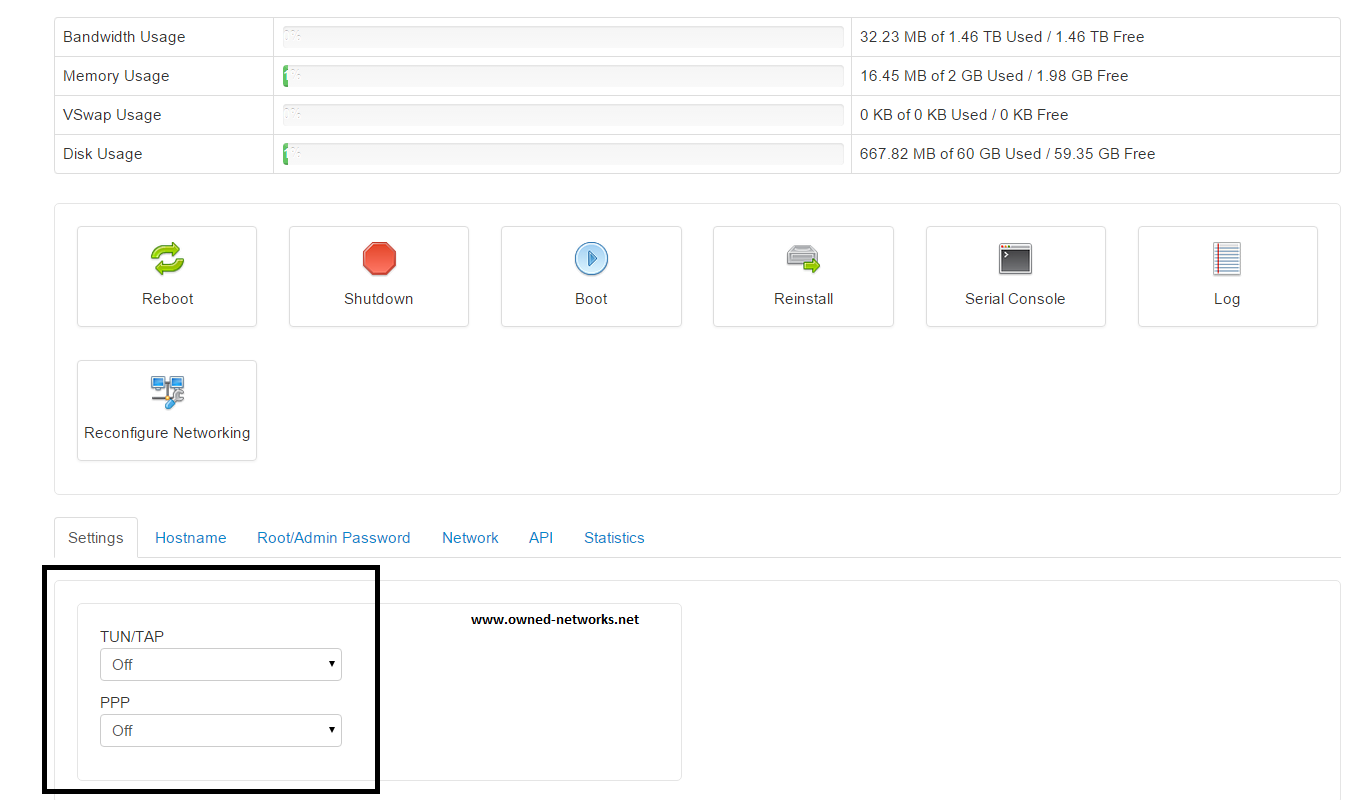
Once you switch both settings to ON your VPS will restart and you should now be able to run a VPN server.
If you believe you need some assistance feel free to contact support via a ticket.
- Home
-
Store
- Browse All
- OpenVZ VPS (Linux Only)
- Shared Hosting - US
- Shared Hosting - EU
- Reseller Hosting - US
- Reseller Hosting - EU
- Dedicated Servers (Baremetal, any OS)
- New York Cloud VPS
- Los Angeles Cloud VPS
- Miami Cloud VPS
- Dallas Cloud VPS
- Seattle Cloud VPS
- London Cloud VPS
- Amsterdam Cloud VPS
- Register a New Domain
- Transfer Domains to Us
- Announcements
- Knowledgebase
- Network Status
- Affiliates
- Contact Us
-
More